 在线客服
在线客服



详解DevExpress.LookUpEdit控件实现自动搜索定位功能|C/S开发框架
 详解DevExpress.LookUpEdit控件实现自动搜索定位功能

详解DevExpress.LookUpEdit控件实现自动搜索定位功能
推荐设置:
lue.SearchMode = SearchMode.AutoSearch;能自动检索下拉窗体的记录,参考:
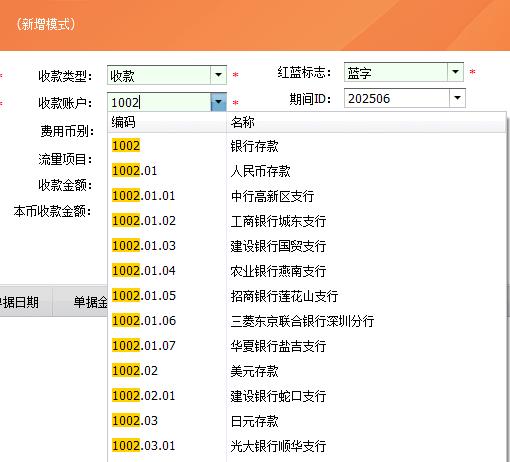
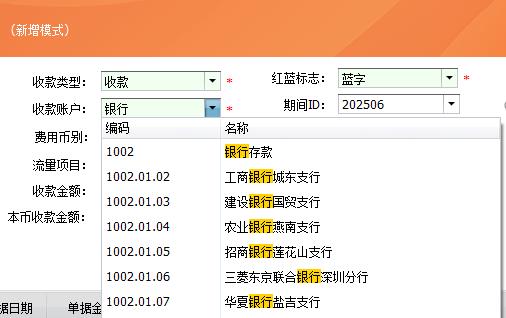
首先介绍三个重要的属性:
1. LookUpEdit.Properties.ImmediatePopup 在输入框按任一可见字符键时立即弹出下拉窗体。
2. LookUpEdit.Properties.AutoSearchColumnIndex 设置自动搜索的栏位序号,下拉窗体第一个栏位为0,依此类推,此属性配合SearchMode=OnlyInPopup时有效。
3. LookUpEdit.Properties.SearchMode 自动搜索定位模式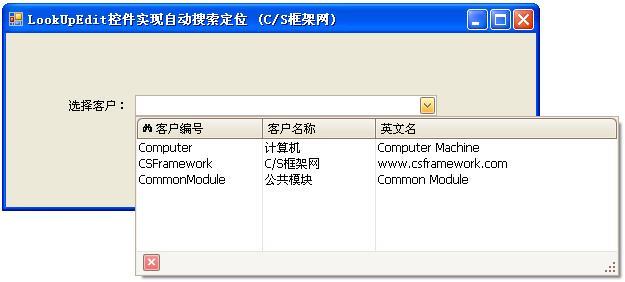
关于枚举类型SearchMode的定义:
// Summary:
// Enumerates search modes for a lookup edior.
public enum SearchMode
{
// Summary:
// The incremental search is enabled only when the dropdown window is open.
// If the window is closed, the user can modify the text in the edit box. However
// these changes are ignored.
// When the dropdown is open the incremental search is performed against the
// column whose index is specified by the DevExpress.XtraEditors.Repository.RepositoryItemLookUpEdit.AutoSearchColumnIndex
// property. The header of this column contains the search icon (binoculars).
// The user can click a specific column header to perform the search against
// this column.
// The following screenshot shows a sample lookup editor. The incremental search
// is performed against the second column.
OnlyInPopup = 0,
//
// Summary:
// Enables the automatic completion feature. In this mode, when the dropdown
// is closed, the text in the edit box is automatically completed if it matches
// a DevExpress.XtraEditors.Repository.RepositoryItemLookUpEditBase.DisplayMember
// field value of one of dropdown rows.
// When the dropdown is open, the automatic completion feature is disabled but
// the editor allows you to perform an incremental search in the same manner
// as when DevExpress.XtraEditors.Controls.SearchMode.OnlyInPopup mode is active.
AutoComplete = 1,
//
// Summary:
// Enables the incremental filtering feature. When you type within the edit
// box, the editor automatically opens the dropdown window and displays only
// records whose DevExpress.XtraEditors.Repository.RepositoryItemLookUpEditBase.DisplayMember
// field value starts with the characters typed. Other records are not displayed.
// If you enter a value that does not match any record, the dropdown window
// will not contain any rows.
// The following image shows a lookup editor when AutoFilter mode is enabled.
AutoFilter = 2,
}
//来源:C/S框架网(www.csframework.com) QQ:1980854898
OnlyInPopup : 配合ImmediatePopup=True时使用,当用户在输入框按任一可见字符键时立即弹出下拉窗体,并跟据输入的字符从头部开始匹配AutoSearchColumnIndex属性指定栏位字段的值,第一个栏位为0.
特点:在下拉窗体能显示匹配结果(蓝底白字),但在输入框内不显示。
效果图如下: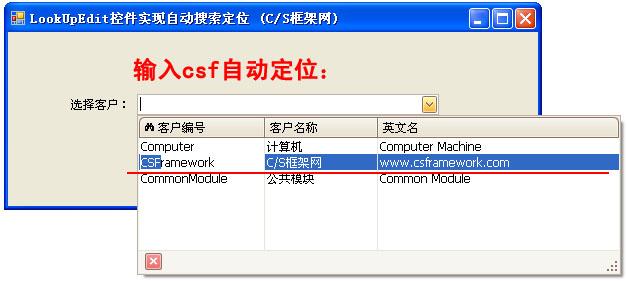
AutoComplete: 配合ImmediatePopup=True时使用,当用户在输入框按任一可见字符键时立即弹出下拉窗体,并在输入框自动完成您想要输入的数据,同时下拉窗体自动匹配最佳记录。AutoComplete模式仅匹配DisplayMember对应字段的值。
特点:能在输入框显示匹配的数据,并且下拉窗体显示匹配的记录。
效果图如下: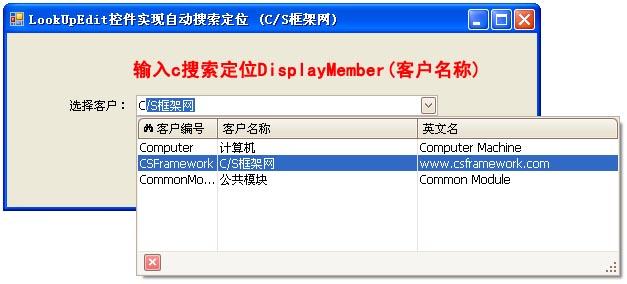
AutoFilter: 配合ImmediatePopup=True时使用,当用户在输入框按任一可见字符键时立即弹出下拉窗体,并在输入框自动完成您想要输入的数据,同时下拉窗体自动过滤掉不匹配的记录。
特点:能在输入框显示匹配的数据,并过滤过不想要的记录。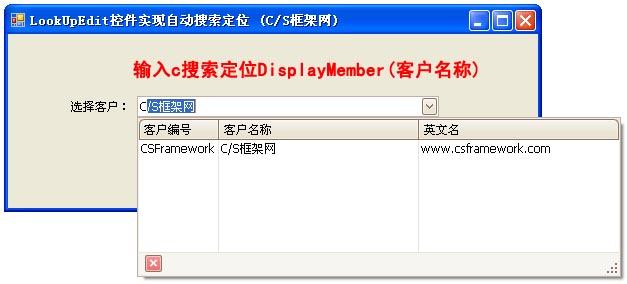

.NET8 WebApi框架接口认证方式:Bearer Token/Jwt Token详解|C/S开发框架
DevExpress XtraReport 开发指南|单表报表设计详解(C#)|C/S开发框架
FastReport.NET2023报表数据源配置详解|C/S开发框架
C# Math.Round方法MidpointRounding参数详解|C/S开发框架
DatabaseProvider类详解|C/S开发框架
UserConfig类详解 | Winform 蝇量级开发框架|C/S开发框架
DataDictCache | 全局缓存设计逻辑详解|C/S开发框架
DataBinder类详解 | Winform MiniFramework蝇量框架|C/S开发框架
ucButtonFunction 组件详解|MiniFramework蝇量框架|Winform框架|C/S开发框架
WinFramework轻量级开发框架 | 功能按钮事件详解|C/S开发框架
WinFramework轻量级开发框架 | 窗体继承关系图详解|C/S开发框架
TableInfoAttribute、KeyField、IgnoreField特性详解|C/S开发框架
OAuth 2.0 access_token / refresh_token 详解-C/S开发框架
.NET 6 优先队列 PriorityQueue 详解-C/S开发框架
C#.NET RESTFul API详解-C/S开发框架
tb_DataSet表(账套数据库配置表)详解-C/S开发框架
什么是C/S结构? | C/S框架核心组成部分 | C/S框架-WebService部署图 | C/S框架-权限管理 | C/S结构系统框架 - 5.1旗舰版介绍 | C/S结构系统框架 - 功能介绍 | C/S结构系统框架 - 产品列表 | C/S结构系统框架 - 应用展示(图) | 三层体系架构详解 | C/S架构轻量级快速开发框架 | C/S框架网客户案例 | WebApi快速开发框架 | C/S框架代码生成器 | 用户授权注册软件系统 | 版本自动升级软件 | 数据库底层应用框架 | CSFramework.CMS内容管理系统 |